
Epson VT6 on a 7th axis vs. Standard Bots Core: two ways to cover a wider cell
A light-part handling cell often outgrows a single robot’s reach long before it outgrows the robot’s payload. When a conveyor, an inspection station, and two kitting stations stretch along 2.4 m of floor, one arm has to service every point in the cycle. There are two usual answers. Drive a compact robot along the line on a 7th axis, or plant a larger robot that reaches every station from a fixed base.
Those two routes push cost, cycle time, and guarding in opposite directions. This comparison sets the Epson VT6-A901S on its compatible igus® 7th axis against a stationary Standard Bots Core (formerly RO1). The robots differ in more than reach: the Core carries six times the Epson’s rated payload, and that gap can settle the decision before reach comes into it.
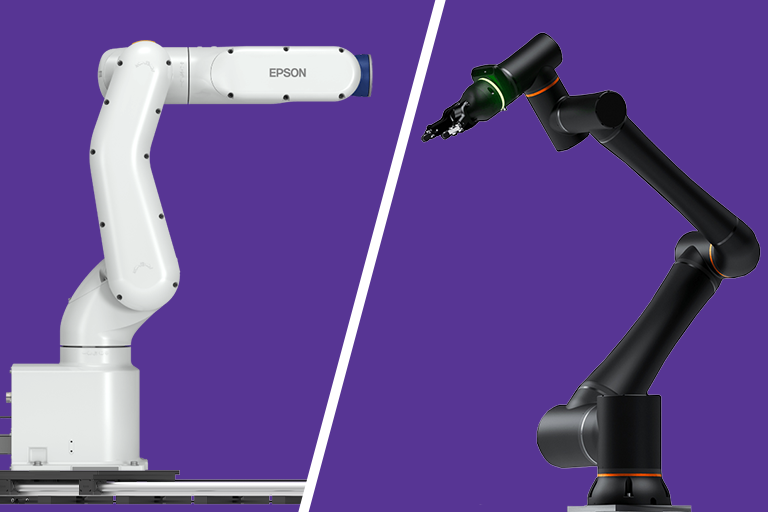
Both setups work through the same example cell below. Each is measured on 7th axis travel, usable reach, cycle time, programming, safeguarding, and total installed cost, with a loose winner called for each.
The Two Setups at a Glance
| Spec | Epson VT6-A901S + igus 7th Axis | Standard Bots Core |
|---|---|---|
| Payload | 3 kg rated; 6 kg maximum | 18 kg |
| Reach | 920 mm from the carriage, plus 7th axis travel | 1.3 m from a fixed base |
| Coverage extension | 7th axis strokes of 1,000–3,000 mm standard; up to 6,000 mm on request | Portable base for moving between cells; no travel built in |
| Repeatability | ±0.1 mm robot; ±0.3 mm 7th axis | ±0.025 mm |
| Speed | 0.60 s standard cycle (Epson test motion); 7th axis travel up to 0.3 m/s | Up to 3 m/s at the tool; 0.75 m/s default collaborative preset |
| Robot weight | 40 kg | 32.5 kg |
| Controller | Built into the robot base; 7th axis adds the DLE-EPSON-0001 control cabinet | Separate control box |
| Programming | Epson RC+ (SPEL+ language) | No-code tablet interface with AI-assisted teaching |
| Robot class | Industrial robot for guarded cells | Industrial robot built for collaborative applications as well as guarded cells |
The robot class matters as much as any row in the table. The VT6-A901S is an industrial robot that runs at full speed inside a guarded cell and stops when that guarding is opened. The Core can run the same way, but it also carries configurable speed, force, and collision limits that let a risk-assessed application share floor space with people. That collaborative capability has no equivalent in the Epson setup, and it shapes both the cycle time and safeguarding results below.
Why Payload Belongs in a Reach Conversation
Epson lists two payload figures for the VT6-A901S: 3 kg rated and 6 kg maximum. The controller sets acceleration from the load entered in the program, so loads above the rated figure move more slowly. Plan around the 3 kg rating, not the 6 kg ceiling, when every tenth of a second counts in a light-part cell.
That budget covers everything mounted to the wrist flange, not just the part. The gripper, its adapter plate, any wrist camera, and the part itself all count against it. A common electric two-finger gripper claims a large share of the 3 kg rating by itself. That leaves less room for the part than the spec sheet suggests.
A 7th axis extends where a robot can work. It adds nothing to what the robot can lift. Heavier part variants, a dual gripper, or a heavier fixture tool can all push a cell past 3 kg. The Core’s 18 kg rating leaves headroom the VT6-A901S cannot match at any stroke length. When payload margin is uncertain, the larger stationary robot is the safer specification, even when a 7th axis covers the reach.
The Example Cell
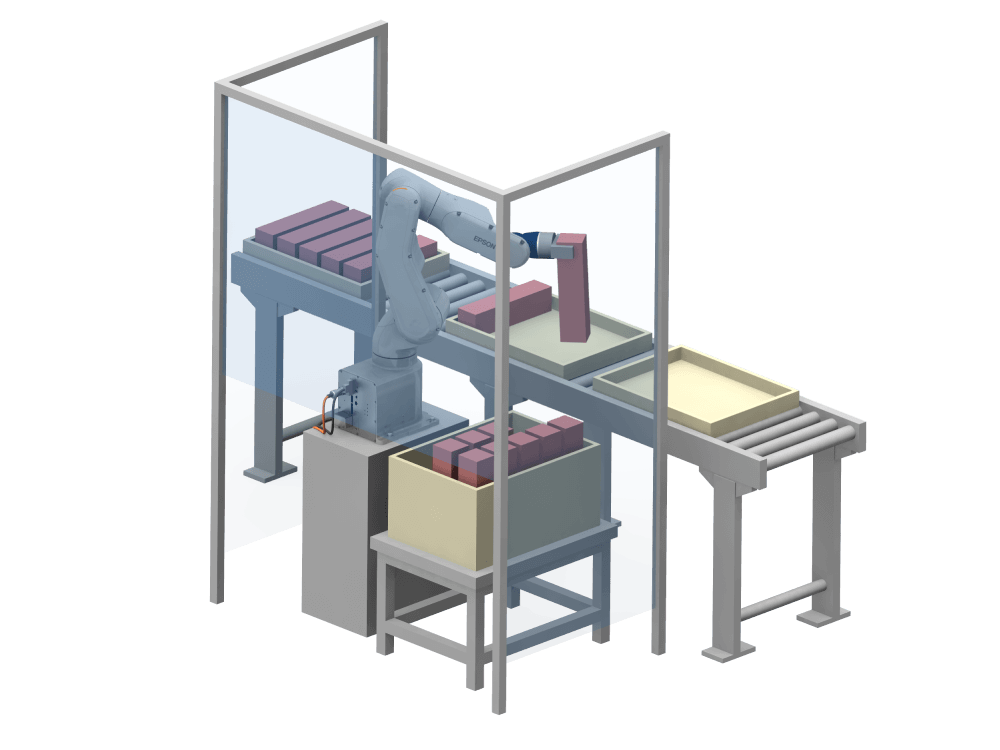
The example line runs 2.4 m. An incoming conveyor sits at one end, followed by a vision inspection station and two kitting stations at roughly even spacing. Each part plus gripper stays under the VT6-A901S’s 3 kg rating, and every station sits at about the same working height.
The Epson rides a 2,000 mm 7th axis that runs parallel to the stations. The Core stands on a fixed pedestal at the midpoint. That puts the two end stations about 1.2 m from its base — inside its 1.3 m reach, but close to the edge. Both setups reach every station, and the differences start with how they get there.
How Much Space Can Each Setup Cover?
The VT6-A901S reaches 920 mm to either side of the carriage, so on a 2,000 mm 7th axis it covers a straight band about 3.8 m long. That leaves spare length in the example cell for a reject bin or a fifth station. Standard strokes run from 1,000 to 3,000 mm, and up to 6,000 mm is available on request. A longer line calls for a longer 7th axis instead of a second robot.
Travel brings a tolerance of its own. The 7th axis repeats to ±0.3 mm on top of the robot’s ±0.1 mm. That stack is comfortable for placing parts in kit trays, but it is worth checking against pin-located fixtures or press fits before the layout is locked.
The Core works inside a fixed envelope with a 1.3 m radius, about 2.6 m across. Reach is not uniform across that envelope. Near the edge, the wrist has fewer ways to approach a part, and reaching down to a low conveyor pulls the usable distance in further. The end stations in the example cell sit in that outer band, so their approach angles deserve a reach study before the design is final.
Depth is where the Core pulls ahead. It reaches in every direction from its base, so stations arranged in an arc, behind the robot, or above a tall fixture all fall inside one envelope. For compact, wrap-around layouts, a stationary arm puts more of its reach to use than a robot that travels in a straight line. Its portable base lets a team relocate it from cell to cell between runs, though not mid-cycle. Standard Bots also lists 7th axis integration, which would bring the Core into the same travel trade-offs covered next.
Which to choose: the Epson on a 7th axis for long, straight, or growing lines; the Core for compact layouts with stations at several depths.
Which Setup Finishes a Cycle Faster?
The 7th axis tops out at 0.3 m/s. If the carriage parks between each pair of stations, each shift covers about 1.2 m. That takes roughly 4 seconds at full speed, before acceleration and settling. A full 2,000 mm traverse takes about 6.7 seconds. The robot controller handles the 7th axis as a separate move rather than blending it into the arm’s path, so carriage travel adds directly to the cycle.
The arm on the carriage is quick: Epson lists a 0.60 s standard cycle time for the VT6-A901S on its own test motion. In a guarded cell, the Core covers station-to-station moves without waiting on travel, reaching up to 3 m/s at the tool. Standard Bots publishes no equivalent test cycle for the Core, so the two figures do not compare directly.
Collaborative operation changes that math. The Core’s default safety preset caps tool speed at 0.75 m/s, a quarter of its maximum. Standard Bots describes that preset as safe for most collaborative settings. The risk assessment sets the final limit. An area scanner can switch the Core to a slow-speed mode only when someone approaches, which keeps full speed available while the area is clear.
Layout narrows the gap for the Epson setup. Put the most-visited station near the center of travel, and batch picks so the carriage shifts once per several parts. Staging parts at each end keeps the arm working between moves. A cell that can batch carriage moves keeps the Epson competitive, while a cell that alternates between the two ends every cycle favors the Core.
Which to choose: the Core when long moves happen every cycle; close to even when the Epson cell can batch its travel.
Programming the Cell
The VT6-A901S programs in Epson RC+, using the SPEL+ language, with simulation, vision guidance, and a GUI builder for operator screens. The 7th axis connects through the DLE-EPSON-0001 control cabinet and moves from within the Epson software, so the robot and 7th axis run from one program. Because carriage position sits outside the arm’s kinematic model, points are taught relative to each carriage stop.
The Core programs from a tablet, using a no-code interface, plain-language AI teaching, and lower-level controls for engineers who want them. Standard Bots includes virtual training and support with the robot. For a plant without a dedicated robot programmer, that interface shortens the path from installation to the first good part.
Which to choose: the Core for teams without a robot programmer; the Epson setup for shops already working in RC+ or relying on offline simulation.
Safeguarding: Industrial Cell vs. Collaborative Application
Both setups answer to the same standards. ISO 10218-1 and ISO 10218-2 were revised in February 2025, and the revision folded the collaborative requirements of ISO/TS 15066 into the ISO 10218 series. ANSI/A3 R15.06-2025 adopts the revised standards in the US. Collaboration now describes the application rather than the robot, so every cell starts with a risk assessment, whatever the data sheet says.
The VT6-A901S is an industrial robot, so the usual result is a guarded cell: perimeter fencing with interlocked doors, light curtains, area scanners, or a mix. The guarding must enclose the full 7th axis travel plus the arm’s reach at both ends, which means the guarded footprint grows with every millimeter of stroke. The moving carriage also adds pinch and crush points at the ends of travel for the assessment to cover.
The Core’s safety I/O is rated PLe, Category 4, and its speed, force, and collision limits are all configurable. Standard Bots states that, with those settings applied and a risk assessment completed, the Core can work unguarded near people. The company also recommends adding a safety scanner. Gripper fingers, sharp parts, and pinch points against fixtures still count, so an unguarded cell is an outcome of the assessment, not a default.
Further reading: What are automation guarding safety standards, and what does hardware look like?
Which to choose: the Core when operators share the space and the assessment supports it. When it does not, both cells end up guarded, and the Epson’s larger guarded footprint becomes the main difference.
What Does Each Setup Cost Installed?
The two setups spend their budgets in different places. The Epson route pairs a lower-payload industrial robot with a 7th axis, a control cabinet, and guarding sized to the full travel. The Core route concentrates the budget in a single, higher-payload arm and may spend less on guarding, depending on the risk assessment.
| Cost Line | Epson VT6-A901S+ 7th Axis | Standard Bots Core |
|---|---|---|
| Robot | Starting at $16,055* | Starting at $39,500* |
| 7th axis & Epson control unit (optional) | 7th axis: starting at $7,522.72*; Control unit: $4,423.49* | Not required |
| e-chain® for 7th axis cabling | Optional | Not applicable |
| End effector | Comparable for both | Comparable for both |
| Safeguarding | Perimeter guarding sized to full travel plus reach | Safety scanner recommended by Standard Bots; more if the assessment requires |
| Programming and integration | RC+ programming, 7th axis setup, and per-stop teaching | No-code programming; virtual training and support included |
| Usual lead time | Robot: 10 weeks; 7th axis: 3 weeks | 2–4 weeks |
*All prices and shipping times accurate as of October 29th, 2026. Check vendor pages for current pricing.
Integration labor can outweigh any line in the hardware column. Programming, commissioning, and the risk assessment land on both setups in different amounts. The Epson cell adds 7th axis setup and per-stop teaching, while the Core leans on its no-code interface and bundled support. Compare quotes on a complete, guarded, programmed cell rather than on arm prices alone.
Related: The 7th axis robot: real cost-saving applications and when it earns its keep
Which Setup Fits Your Cell?
| Factor | Leans Toward | Why |
|---|---|---|
| Payload headroom | Standard Bots Core | 18 kg vs. 3 kg rated; a 7th axis adds no payload |
| Long or growing straight lines | Epson + 7th axis | Strokes to 3,000 mm standard, 6,000 mm on request |
| Stations at several depths | Standard Bots Core | Reaches in every direction from one base |
| Cycle time with frequent long moves | Standard Bots Core | No carriage travel at 0.3 m/s |
| Cycle time with batched moves | Close | Depends on layout and collaborative speed limits |
| Placement repeatability | Standard Bots Core | ±0.025 mm vs. ±0.1 mm robot plus ±0.3 mm travel |
| Programming without a robot specialist | Standard Bots Core | No-code tablet interface |
| Existing Epson RC+ expertise | Epson + 7th axis | Robot and 7th axis run from one RC+ program |
| Working beside operators | Standard Bots Core | Collaborative operation, subject to risk assessment |
| Lead time | Standard Bots Core | 2–4 weeks vs. 10 weeks for the robot |
| Installed cost | Depends on the cell | Quote the complete, guarded, programmed cell |
Choose the Epson VT6-A901S on a 7th axis when:
- Stations run in a long line: the cell spans more than one fixed robot can reach, or may grow later.
- Parts stay light: part plus gripper sits comfortably under the 3 kg rating, with no heavier variants planned.
- The cell will be guarded anyway: the process already calls for fencing or a closed enclosure.
- Your team works in RC+: the robot and 7th axis run from one familiar program.
Choose the Standard Bots Core when:
- Payload may grow: heavier parts, a dual gripper, or a wrist camera would push past the Epson’s rating.
- Stations sit at several depths: an arc or wrap-around layout fits inside one fixed envelope.
- Operators share the space: the risk assessment supports collaborative operation.
- Long moves happen every cycle: the cell cannot batch travel between distant stations.
Reach decides whether a robot can get to a station. Payload, travel speed, and guarding decide whether it does the job well once it gets there. If your layout sits between these two setups, an RBTXpert can review stations, part weights, and guarding with you before either route is locked in.