
RBTXpert Debrief: The Automation Starter Guide Worth Bookmarking
- Partner Resource: Epson Robots — Automation 101: A Step-by-Step Guide to Getting Started With Robotics
- Content Type: Beginner’s Guide
- Published: 2017 (see “What Has Changed Since 2017,” below)
- Best For: Business owners, operations managers, and engineers evaluating their first automation project
Why We Are Sharing This
Most automation content assumes you already know what you need. It jumps straight into specifications, robot types, and integration complexity without addressing the question that stops most first-time buyers cold: where do I actually start?
Epson’s Automation 101 guide does not make that assumption. It opens at the beginning, works through the process logically, and arrives at equipment selection only after the foundational thinking is done. That sequencing is exactly right, and it is why RBTX Learn is highlighting this piece.
It is also nine years old, and it was written for a version of the market that no longer describes every buyer’s options. The framework holds up. The assumed path to the finish line does not, at least not for everyone. We are sharing the guide and then telling you plainly what you need to supply yourself.
What the Content Actually Covers
Start With Why, Not What
The guide opens with a question most vendors skip entirely: why are you thinking about automating? It frames five distinct drivers: cost reduction, volume increase, quality consistency, precision requirements, and worker safety.
This matters in practice because each driver leads to a different automation priority. A shop automating for precision specifies differently than one automating for throughput. Getting clear on the primary driver before evaluating any hardware prevents the most common first-time mistake, which is specifying a system around the wrong outcome.
Know Your Process Before You Touch a Spec Sheet
The second section covers process analysis, and RBTX Learn considers this the most valuable part of the guide for anyone early in their automation journey. The core question is direct: can you explain your current process clearly to someone who has never seen it? If the answer is no, no robot vendor or systems integrator can build you a good solution.
The guide walks through a realistic assembly example — a plastic body shell with two metal inserts and a screw driving step — and identifies the quality and cycle time problems hiding inside what looks like a simple process. Variety in the body shells, deviation in part tolerances, right-side-up insertion, and stripped or missed screws are all named directly.
The guide also introduces Design for Assembly (DFA), and this deserves more attention than the single paragraph it gets. DFA is the discipline of reducing part count and simplifying assembly sequence before you automate. It is the single highest-leverage thing you can do on a first project, because every part you eliminate is a feeder you do not buy, a gripper change you do not program, and a failure mode you do not have to handle. Buyers who skip DFA routinely automate a process that should have been redesigned first, and then pay for that decision in tooling.
The Requirements That Drive Every Decision
The guide names speed, precision, and payload as the three variables every robot application must balance, and it is honest about the tradeoffs. Maximizing one frequently constrains another. A customer demanding the fastest possible cycle time accepts tooling weight restrictions and motion path optimization as part of that commitment. A customer prioritizing precision accepts speed concessions.
It then lists four requirements you have to put numbers against. Two of them get discussed constantly and two get forgotten:
Precision. The guide gives the most useful numbers in the entire document: most small-assembly applications land somewhere between 25 and 200 microns, while Epson robot repeatability goes down to 5 microns. Write that range down. It is the fastest way to find out whether your precision anxiety is real. For context, the Epson SCARA T3-B401S listed on RBTX specifies ±0.02 mm repeatability — 20 microns — which sits at the tight end of that band on an entry-level machine.
Payload. The guide correctly points out that most buyers define payload as the part weight alone. Payload is the total mass on the end of the arm, tooling included, and in small assembly the tooling routinely outweighs the part. The guide also advises stepping up a robot size when you approach the rated maximum, which is sound and frequently ignored.
Cycle time. Start from parts per week, divide backwards, and you have the number that determines whether one robot is enough. Again, a concrete anchor: the T3-B401S is specified at a 0.52 second standard cycle. Compare that against your requirement before you assume you need a second cell.
Reach. Determined by part size and travel distance, and it depends on the full workcell layout rather than the robot alone. This is the requirement most likely to be discovered late, after a fixture position is already fixed.
Components: Including the Two Everyone Skips
The guide covers parts presentation, vision, and end-of-arm tooling, and that coverage is appropriately high level. It also covers two items that most beginner content omits entirely, and we want them called out:
Factory standards. Do you know your plant’s fieldbus? EtherNet/IP, PROFINET, DeviceNet — the answer determines whether the robot talks to the rest of your line without a translation layer. This is a five-minute question that saves a five-figure surprise. It is also worth checking against the robot before you buy: to return to our running example, the T3-B401S supports EtherNet/IP, PROFINET, and DeviceNet, and runs on standard 100–240 V AC without special connectors.
Base rigidity. This is the most field-earned observation in the guide and the one first-time buyers never anticipate. An under-rigid base moves when the robot moves. The system then has to settle before it can place accurately, which quietly destroys the cycle time you specified the robot for. If you are mounting a fast, precise robot on a bench you already own, that bench is now a specification, not furniture.
Manpower: Who Actually Builds It
The guide closes by naming the disciplines a build requires: controls, electrical, mechanical, and software engineering, whether in-house or contracted. If you do not have those four, you go to a systems integrator.
This is the guide’s most decision-forcing section, and it is also where a document from 2017 shows its age.
What Has Changed Since 2017
The Epson guide was released in 2017. Here is what a 2026 reader has to add:
The “build a custom cell” assumption. In 2017, the realistic path from “I have a process” to “I have a robot” ran through a systems integrator building a bespoke workcell. That path still exists and is still correct for complex, high-mix, or safety-critical applications. But it is no longer the only path, and the guide’s manpower section reads as if it is. For a simple, well-understood, single-part-family task, pre-configured components sourced directly and assembled in-house is now a legitimate option — and it is a different specification exercise, because you are matching your requirements to what already exists rather than describing them to someone who will build to order.
The price floor moved. Entry-level industrial arms are no longer a five-figure-minimum decision. As currently listed on RBTX, the Epson SCARA T3 (400 mm, 3 kg) is $7,895, the Epson SCARA T6 (600 mm, 6 kg) is $9,995, and the Epson VT6 6-axis (920 mm, 6 kg) is $14,595. Prices change; check current listings. The point is the order of magnitude, and it is not what the 2017 guide’s readers were working with.
Cobots are absent. The guide covers SCARA and 6-axis industrial robots and does not discuss collaborative robots at all, which is unsurprising for its vintage and a real gap now. If your driver is worker safety or you need to share floor space with people, cobots change the guarding and layout calculus considerably.
No ROI framework. The guide tells you how to specify a system and never tells you how to justify one. That is the section your CFO cares about, and you have to write it yourself. Start below.
Doing the ROI Math the Guide Skips
The guide gets you to a specification. It does not get you to a decision. Here is the arithmetic, using public numbers so you can substitute your own.
Labor side. U.S. Bureau of Labor Statistics data puts total employer compensation for private industry workers at $46.60 per hour worked as of March 2026 — $32.60 in wages and $14.01 in benefits (BLS, Employer Costs for Employee Compensation). Fully loaded, one position on one shift at 2,080 hours runs roughly $96,900 per year. Use your own fully loaded rate if you have it; use this if you do not.
Displacement side. Be conservative here, and be honest. A robot cell rarely eliminates a whole position — someone still loads, unloads, monitors, and clears faults. If you claim 50 percent of one position redeployed rather than 100 percent eliminated, you are looking at roughly $48,000 per year in recovered labor capacity, and your finance team will believe the number.
System side. The arm is not the system. Budget for end-of-arm tooling, parts presentation, fixturing, a rigid base, safety provisions, and programming time. On a simple benchtop cell built from marketplace components, the arm may be the largest single line item but it will not be most of the total.
Even under conservative assumptions, a low-cost benchtop cell against half a position of recovered labor lands in the sub-two-year range — which is inside the payback window most manufacturers require. Run it with your own numbers before you believe it.
Two honest caveats. First, do not count soft benefits as hard savings. Quality improvement and injury reduction are real, but they are not line items your CFO will accept without measurement. Second, budget ramp-up. A new cell does not hit rated throughput on day one, and savings do not start accruing until it does.
The RBTXpert Pre-Quote Worksheet
The guide repeatedly advises arriving at the vendor conversation prepared, then hands you nothing to arrive with. Fill out the worksheet below before you contact anyone — an integrator, a robot vendor, or an RBTXpert. Every line comes from a question the Epson guide raises.
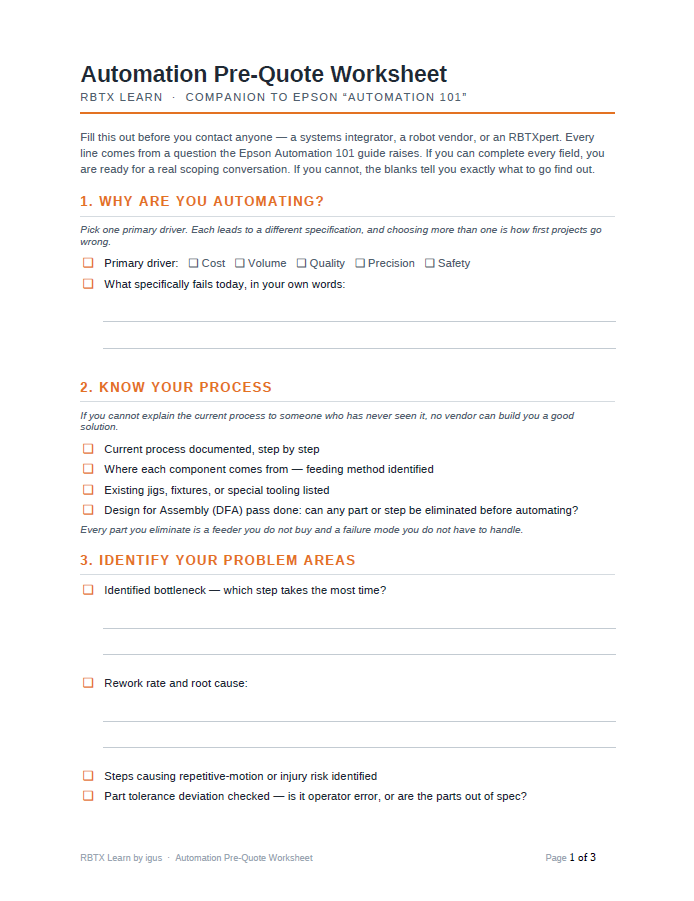
If you can fill in every line, you are ready for a real conversation. If you cannot, the blanks tell you exactly what to go find out — which is the whole point of the Epson guide.
The RBTXpert Take
Read this guide. The structured thinking it promotes — starting with why, documenting the current process, identifying problem areas, then defining requirements — is the same framework experienced integrators use when qualifying a new application, and adopting it early puts first-time buyers in a stronger position before any vendor conversation begins.
Then supply the three things it does not give you: a current view of what entry-level hardware actually costs, an ROI case in your own numbers, and a decision about whether your application needs a custom-built cell or can be assembled from components that already exist. The guide will not make that last call for you, and in 2017 it did not have to.
Access the full Epson Automation 101 guide Here.
Check out Epson on RBTX Here.